

kuando Busylight Combi
Installation
Installation of kuando Busylight Combi
Installation

Take the headset cord out of the telephone and insert the pre-installed cord from the Busylight box into the telephone instead.

Insert the headset cord (that was in the telephone before) in the front of the Busylight box.

Insert the cord for the Busylight lamp into the Busylight box and mount the lamp on your screen (or another visible place) with the round tape. Avoid placing the lamp in direct sunlight.

Connect power to the Busylight box with the USB cord.

Fix the Busylight box to the table using the rectangular tape.
Installation of kuando Busylight Combi
Installation
Take the headset cord out of the telephone and insert the pre-installed cord from the Busylight box into the telephone instead.
Insert the headset cord (that was in the telephone before) in the front of the Busylight box.
Insert the cord for the Busylight lamp into the Busylight box and mount the lamp on your screen (or another visible place) with the round tape. Avoid placing the lamp in direct sunlight.
Connect power to the Busylight box with the USB cord.
Fix the Busylight box to the table using the rectangular tape.
Troubleshooting
I can't get a dial tone in the headset
Step 1
Check installation(see installation guide)
Step 2

The two selection switches on the side of the Busylight box have the factory setting "I". Move them both to "II" and check if the problem is solved.
Busylight doesn't light up during conversation in the headset
Step 1
Check installation(see installation guide)
Step 2

Adjust the sensitivity controller on the turnwheel to find the level that suits your voice and your headset.
Busylight ”flashes” or fades out too quickly
The Busylight lamp fades out, when there is a pause in the conversation and when the call is terminated. You can adjust how long the pause can last, before the lamp fades out.
In position "0" the light goes out after 3,5 seconds. Every step (0-9) increases the interval by 2 seconds.
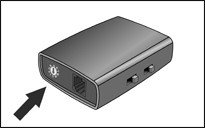
Busylight Combi only lights blue
The Busylight box has a manual switch for a blue light. This is designed to be a Do Not Disturb indicator. If this switch is activated, it will override the red light for headset activity.
Please turn off the blue light to see the automatic red light for headset conversation.
Frequently Asked Questions - FAQ's Combi
Please check the table below.

The standard box for Busylight Combi only allows you to connect either your headset or your handset.
No, sorry. Busylight Combi supports corded and wireless headsets with a base, but not Bluetooth.
Red: Busy on the phone
Blue: Do Not Disturb
No, sorry. Busylight Combi does not offer any call alert.
If a call is put on hold, and mic is still active, then your voice will keep the light on if you are talking. If you mute the call and then go on hold, then the light will go off, since your voice (talking) is not heard.


We are the Danish technology company behind Busylight, making workplace communication clearer since 2003.
Our sister company, Globe Systems A/S, has specialized in headsets since 1999.